Google Play Store PC
Gives you access to any type of Apk Android App on your Windows PC.

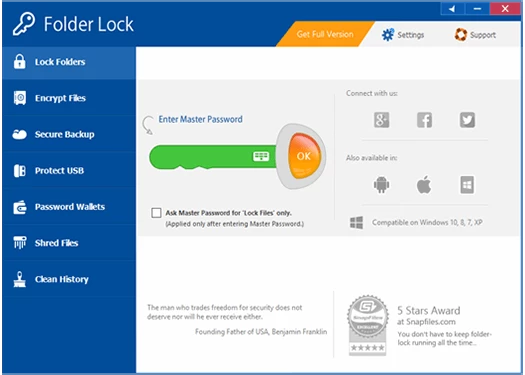
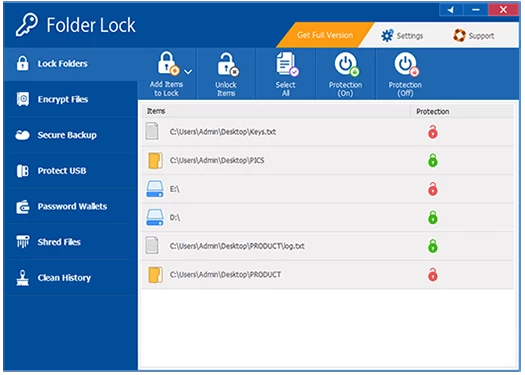
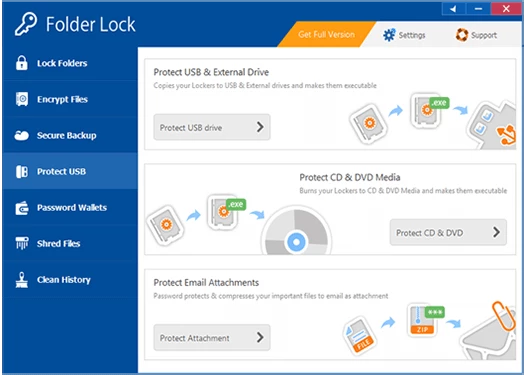
Folder Lock is a comprehensive security tool to provide military-grade protection for your stored data, even in Safe Mode. It helps in creating of encrypted locker to keep your sensitive as well as private information while avoiding unauthorized access to your data.
The support for cloud backup and real-time synchronization across multiple devices offers quick and safe accessibility. It uses AES 256-bit encryption, and multiple simple configuration options make your folder or file storage process more flexible and versatile.
Folder Lock, developed by Newsoftwares, is the best solution to avoid major data theft concerns, even if you are using a shared device. It offers military-grade AES 256-bit encryption while working as an extra firewall to allow only authorized access to the files stored in a Windows PC or any other device.
The innovative software offers enhanced security, even for portable devices, including USB, CD, and DVD, to allow users to share their data more reliably. It also offers personalized digital wallets to manage your finance-related data, including debit/credit cards as well. It helps to enjoy a more unified interface while deleting media player history, temporary files, online browsing history, clipboard data, and so on.
Click on the “Download” button given on the page, and download the file. Click to run the installer, and install the executable file. After installation, launch the app and navigate to the main screen. The app is integrated into the File Explorer, and you can easily select any file or folder and encrypt it while using the “Encrypt Data” option. Likewise, use the Disguise button to hide any file or folder. The app also enables users to view their history to manage their workflow more reliably.
The app offers a simple and user-friendly interface, regardless of the device you are using, and allows you to manage your important documents, personal photos, and other folders. You will find an organized interface with multiple innovative features, including password protection, digital wallets, secure notes, and so on. You also have a file shredding option to delete files or folders permanently, and clean browsing history as well. It also helps to maintain your collaboration and privacy while offering a secure and encrypted file-sharing process.
The app offers awesome integration with multiple cloud services such as Dropbox, Google Drive, OneDrive, and so on. It allows you to encrypt files locally and sync them across multiple devices within foolproof privacy. It decreases the data loss while providing seamless backup and syncing options for your ease.
The app offers three innovative methods to protect your files and folders and prevent unauthorized access.
The app offers awesome security for your personal and professional activities, as it also enables you to create Encrypted Wallets, and helps to store your personal information, even more sensitive credentials, including Credit Cards, Bank Accounts, Business Cards, and so on.
You also have the option of file or folder shredding to shred your files, folders, drives, and even hard drive space. It will help you to clean your browsing history, delete the clipboard, media player history, temporary files, and so on.
The app works like an extra firewall to protect your files and folders while offering cross-platform compatibility for multiple digital devices, including Windows 11 and Windows 10, Android, tablet, macOS, and so on. In addition, it is also compatible with both 32-bit and 64-bit operating systems.
Compared to other similar apps, it proves more flexible while offering the versatility of workflow, as it offers dual-mode protection; you can lock your files or folders, or simply hide the folders using a password. It is the best solution in case of using a shared device.
The free-to-use software not only allows managing your device’s content, but also offers remote management while supporting multiple portable devices, including CDs, DVDs, and USB sticks. It also manages your media files, including videos, photos, etc as well.
The app offers support for multiple types of file formats, such as memory cards, including SD cards, microSDs, etc. You can use it for branded hard drives, such as Dell, HP, etc, removable drives, and flash drives as well. Likewise, you can also use it for cameras and camcorders of various brands such as Canon, Nikon, etc.
Pros
Cons
Gives you access to any type of Apk Android App on your Windows PC.

PC App Store download, install, and keeps up-to-date your PC programs
free emulator to play Android apps on your pc with extra performance, reliability

Bijoy Bayanno the most powerful software to write Bengali language on PC
Media Creation Tool is upgrading and installing Windows 10 bootable installed disks.

Rufus easily change your USB Flash to a bootable ISO flash drives.